How Much Should a Website Cost in 2026?

How Much Does a Website Cost in 2026?
One of the most common questions I get asked by small business owners is that they know they need a website for their business, "but how much should it cost?"
And the worst part about this question, is that there are so many different platforms, packages and different ways to go about this, that there really isn't always a clear answer; especially depending on what they need from their website.
With that being said, in today's blog I will be making a side by side comparison of some of the top website builders in the world right now, their strengths & weaknesses, as well as the million dollar question: how much does it cost to build your small business website.
Let's get into it.
How much does a Squarespace Website Cost?
Squarespace is a great option for those do-it-yourself business owners that either have the time, or interest, in managing their own website. They offer a great suite of drag and drop components, and you can also purchase custom, premade themes if you're interested in having more of a refined look, but don't necessarily have the skills to accomplish it on your own.
Here are the strengths:
- Unlimited pages, bandwidth, storage
- Free SSL certificate
- Free custom domain (year 1 only)
- Contact forms
- Basic SEO tools
- 24/7 customer support
Here are the weaknesses:
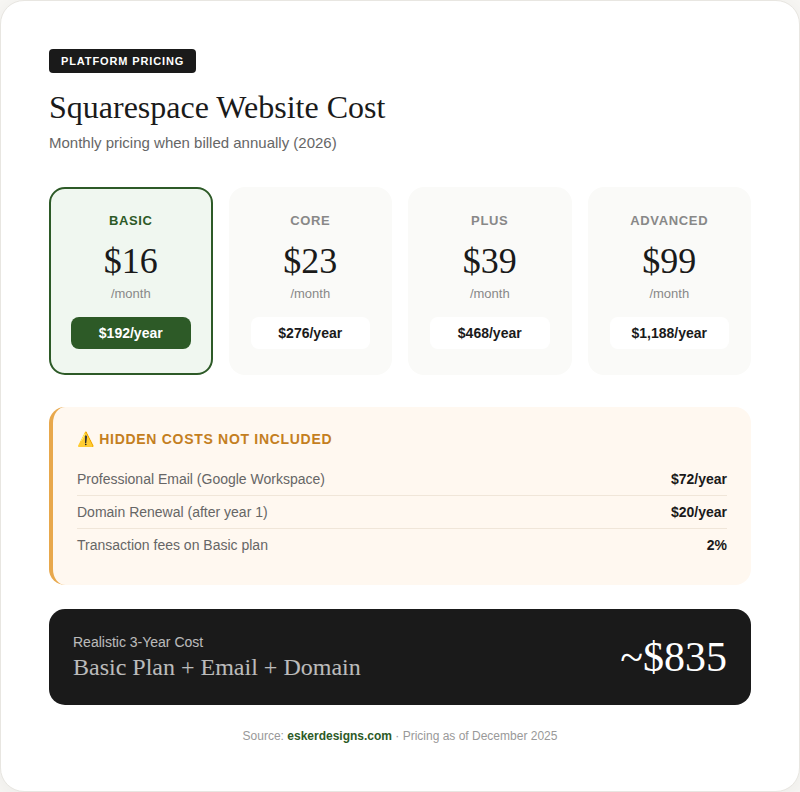
- Email not included: You need to pay for Google Workspace ($72/yr)
- Domain renewal: Free year 1, then ~$20/yr
- Price hikes: You are subject to price increases with no real recourse. In February of 2025, Squarespace Commerce plans increased 40-90%
And here's what it would cost you:
In my mind, a base Squarespace website would be great for people that:
- Have more free time than money to invest in their website
- Who are comfortable learning and tech savvy
- Want a simple site and are okay with using prebuilt templates
- You don't foresee a need for a more complex website down the road
If you need any kind of custom functionality that is not pre-built into the Squarespace ecosystem, you think your business might outgrow the platform, and you don't have the time to invest 20+ hours into design and development, I don't think that Squarespace would be the right fit for you.
How much does a Wix Website Cost?
Wix is very similar to Squarespace in the sense that it is great for go-getters that are not afraid of getting their hands a little dirty to learn about how to promote their business online. It is a relatively user-friendly tool that can allow anyone to build their own website, but it does come with some noteworthy trade-offs that should be considered when asking yourself if it is the right platform for your business website.
Here's whats included in the base plan:
- Removes Wix ads
- Free domain (year 1)
- SSL certificate
- Up to 4 contact forms
- 2 collaborators
- 24/7 customer support
And here are some of the hidden costs, depending on your business needs:
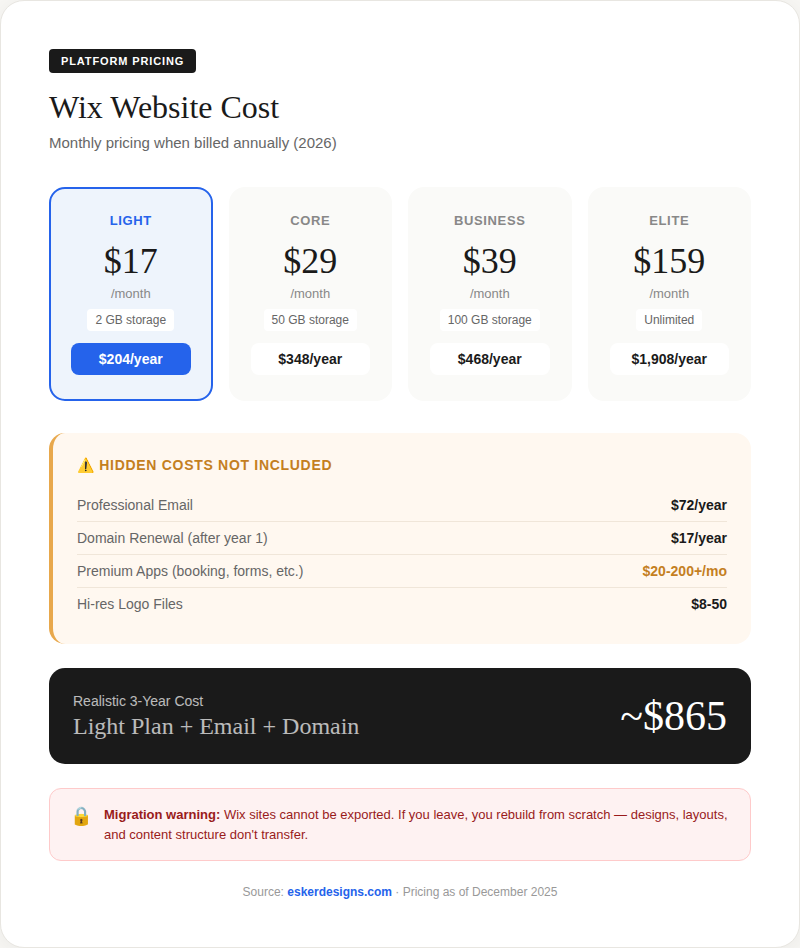
Email not included: Need Google Workspace (~$72/yr)
Domain renewal: ~$17/yr after year 1
Premium apps: Many essential features require paid apps ($20-200+/mo)
- Advanced booking: $20-80/mo
- Advanced forms: $10-45/mo
- Social media tools: $20-60/mo
Logo Maker gotcha: Create free, but hi-res files cost $8-50 extra
Ad voucher bait: Core plan's "$600 in ad vouchers" are trial credits that expire
And here is what it would cost you over a three year period.
As far as who Wix could best serve, I would think that it would be the same folks that would benefit from a Squarespace website. This is a great option for businesses that are just starting out, and need something to get themselves out there with relatively low upfront costs. It's not the best option, and there is a strong chance you will eventually need a more comprehensive solution if the business takes off, but it a great first step for a brand new small business.
Base Plans vs. Premium Plans
Now one quick thing I wanted to mention before moving on to some of our other plans; the above pricing is for the Wix and Squarespace most basic plans, meaning that they do not include many features that most businesses could benefit from. All of those add-ons come at an additional cost, and for a lot of small businesses it might come as a bit of a surprise down the road. It is a tough pill to swallow to go from a nice, cheap website, to something that is three times the price overnight when you realize that you do need an online booking platform.
To illustrate the hidden cost of these tiered pricing plans, I have laid out a few more scenarios of the three-year pricing of each platforms mid-tier and top-tier solution:
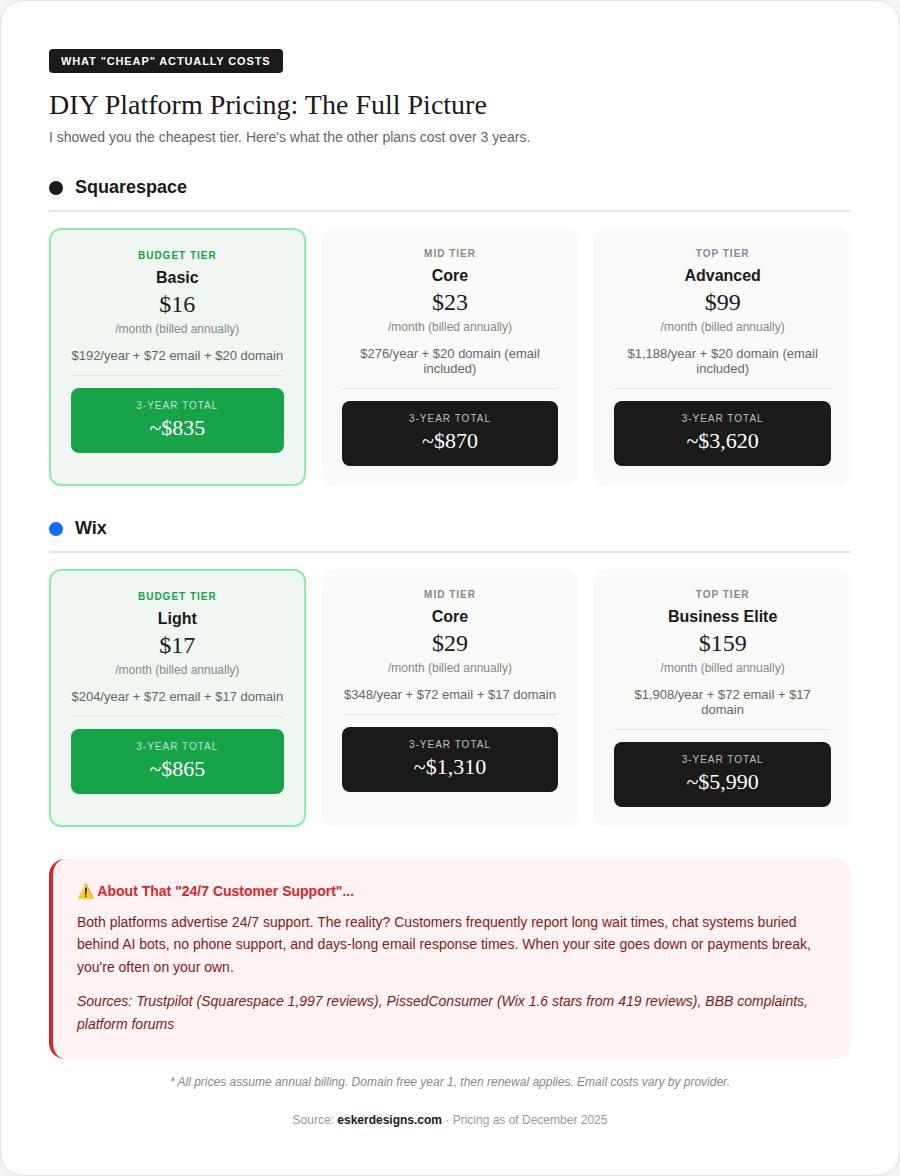
As you can see, the costs jump surprisingly, and that is for a platform in which you are expected to do all the work yourself. They do advertise '24/7' support, but this support is often times email online or via call centers overseas, and you will be hard-pressed to get timely or effective support form either of these platform providers.
At the end of the day with Wix and Squarespace, you are paying for a software, not a service.
How much does a WordPress Website Cost?
WordPress is a bit of a different animal compared to Squarespace and Wix. While those platforms are "all-in-one" solutions where you pay one company for everything, WordPress is open-source software that you install on your own hosting. This gives you far more control and flexibility, but it also means you're responsible for piecing together (and maintaining) all the different parts yourself.
The biggest misconception about WordPress is that it's "free." Yes, the software itself is free to download. But hosting, themes, plugins, security, backups, and your time? Those all cost money.
The Hosting Renewal Trap
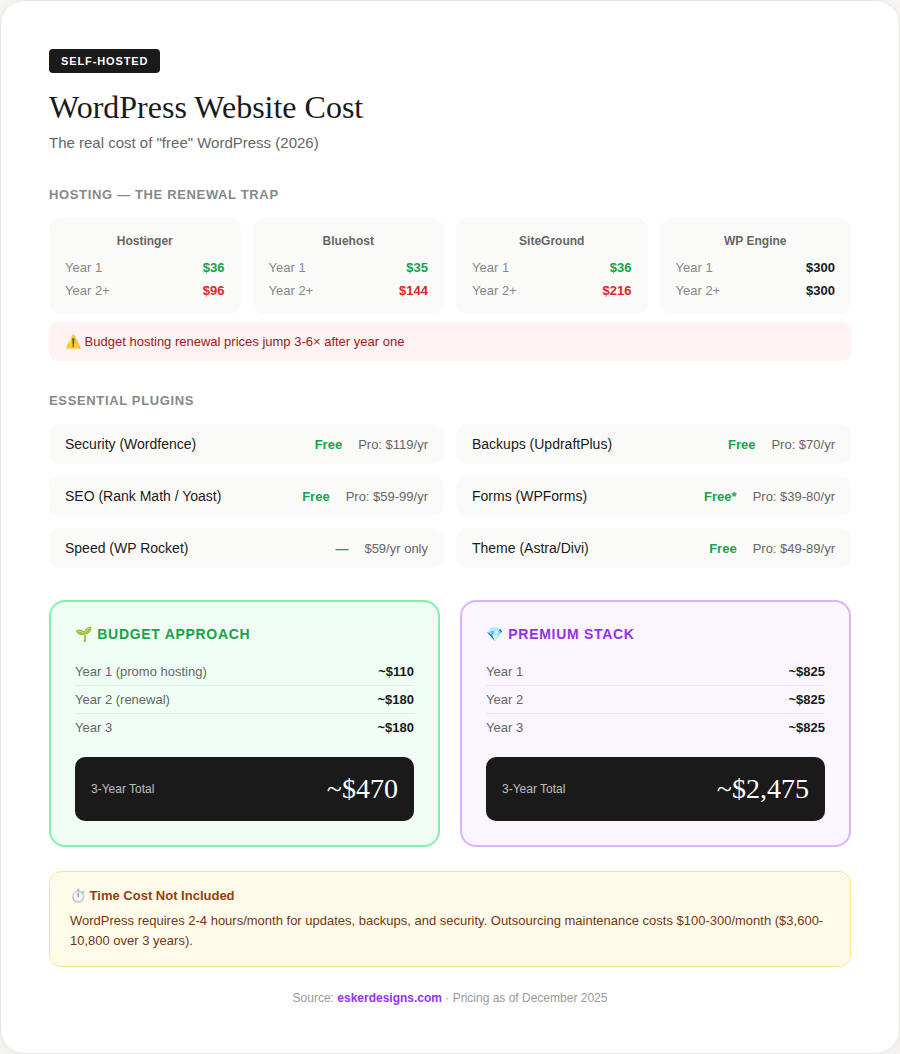
This is something that catches a lot of people off guard. Budget hosting companies advertise incredibly low prices to get you in the door, then hit you with significant renewal increases:
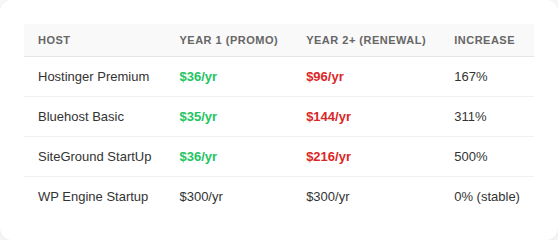
That $3/month hosting you signed up for? It's actually $12-18/month once the promotional period expires.
Plugin Costs Add Up
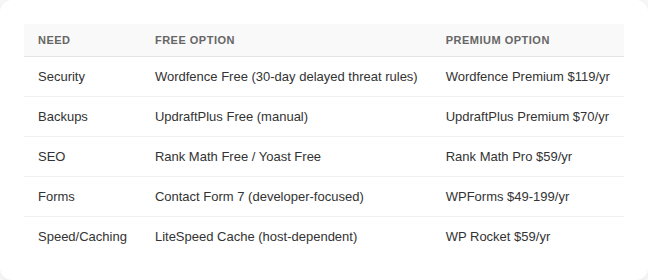
WordPress relies on plugins for most functionality. While many have free versions, you'll often find yourself needing premium features:
The Real Cost: Two Scenarios
Budget Approach (Free Plugins, Promotional Hosting)
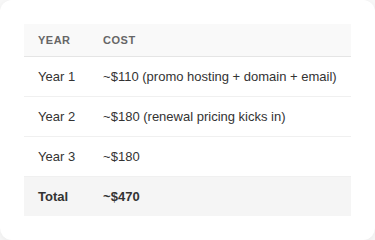
Plus 2-4 hours of your time every month for updates, backups, and security monitoring.
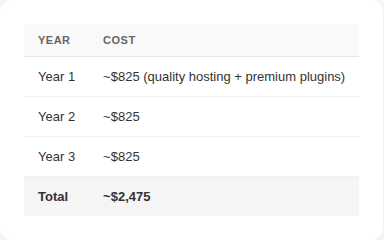
Premium Approach (Paid Plugins, Stable Hosting)
The Maintenance Reality
Here's the part that most "WordPress is cheap" articles leave out: WordPress requires ongoing maintenance.
- Core updates need to be applied monthly
- Theme updates need to be tested and installed
- Plugin updates need to be monitored for conflicts
- Security vulnerabilities need to be patched
- Backups need to be verified and stored offsite
If you're comfortable with technology and don't mind spending 2-4 hours per month on this, WordPress can work well for you. If that sounds like more than you want to take on, you'll need to hire someone, and professional WordPress maintenance typically runs $100-300/month. That adds $1,200-3,600 per year to your costs.
Who WordPress is for:
- Technical users who want control over every aspect of their site
- Those willing to invest time into learning new skills
- Businesses that need complex custom functionality
- People who are comfortable with ongoing technical maintenance
Who might want to consider other options:
- Non-technical business owners who want a hands-off solution
- Anyone expecting "set it and forget it"
- Busy professionals without dedicated IT support
WordPress can be the most affordable option on paper, but only if you're comfortable handling the technical side yourself. For many small business owners I talk to, the ongoing time investment ends up being more than they anticipated.
How Much Does It Cost to Hire a Web Designer?
So let's say you've decided that building your own website isn't the right fit. You don't have the time, the interest, or you'd simply rather focus on running your business. What should you expect to pay when hiring a professional?
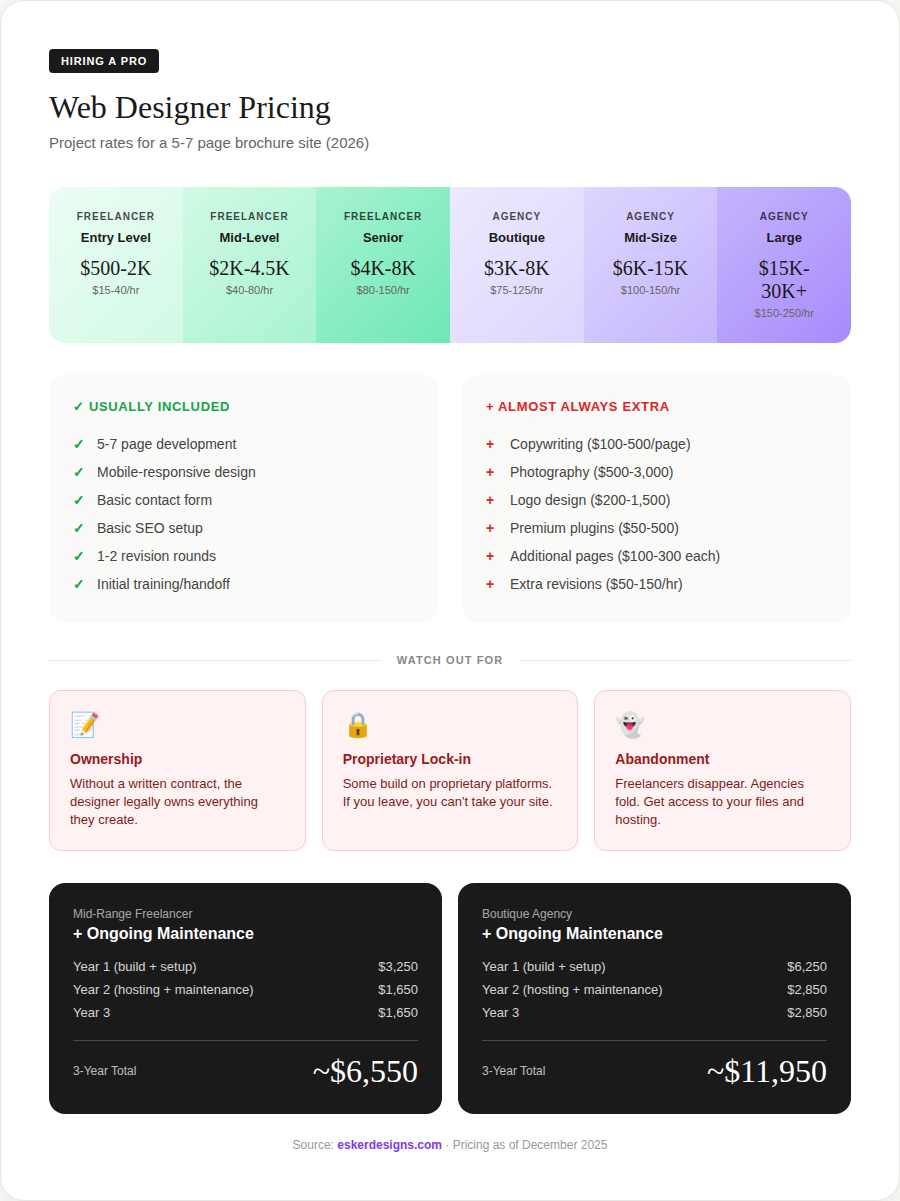
The honest answer is that it varies quite a bit depending on who you hire.
Location can also be a factor — agencies in major cities like New York or San Francisco often charge 20-40% more than those in smaller markets or working remotely.
What's Typically Included
For a standard small business website (5-7 pages), most quotes will include:
- Platform setup (usually WordPress)
- Mobile-responsive design
- Contact form
- Basic SEO setup
- 1-2 rounds of revisions
- A training or handoff session
What's Usually Extra
These items are often not included in the base quote, so it's worth asking about upfront:
- Copywriting: $100-500 per page (if you're a contractor, you can get a head start with our free copy generator before hiring a pro)
- Photography: $500-3,000
- Logo design: $200-1,500
- Premium plugins or tools: $50-500+
- Additional pages: $100-300 per page
- Extra revision rounds: $50-150/hr
A Few Things to Keep in Mind
There are some things worth being aware of when hiring a designer or agency:
Ownership: It's important to have a clear contract that specifies you own the finished work. You'll also want to make sure you receive all the files, login credentials, and access to hosting and domain registration.
Platform questions: Some designers build on proprietary systems or page builders that can make it difficult to move your site later. It's reasonable to ask what platform they use and whether you'd be able to take your site to another developer if needed.
Ongoing support: Most one-time projects don't include post-launch support. It's worth discussing what happens after the site launches — whether they offer maintenance packages, or if you'll need to find support elsewhere.
What It Costs Over 3 Years
If you hire a mid-range freelancer and want ongoing maintenance support:
YearCostYear 1~$4,350 (build + hosting + maintenance)Year 2~$1,350Year 3~$1,350Total~$7,050
For a boutique agency with a maintenance retainer:
YearCostYear 1~$8,700Year 2~$3,200Year 3~$3,200Total~$15,100
The Page Builder Question
This is something worth mentioning if you're considering hiring someone to build a WordPress site.
Many freelancers and agencies use page builders like Elementor, Divi, or WPBakery. These are drag-and-drop tools that make it faster to build sites without writing code. They're popular for good reason — they can significantly reduce development time.
However, there are some trade-offs to be aware of:
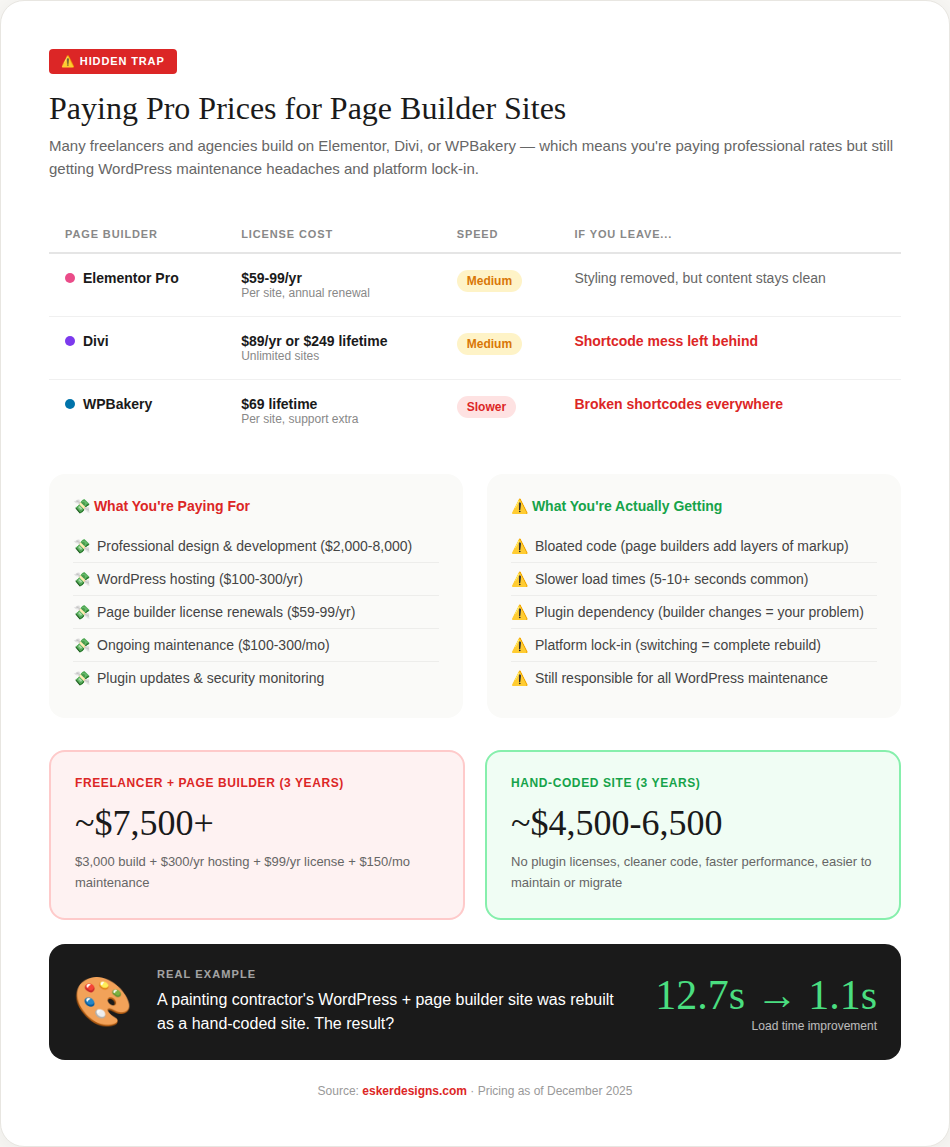
Performance: Page builders add extra code to your site, which can affect load times. Sites built with page builders tend to be slower than hand-coded sites.
Plugin dependency: Your site becomes dependent on that page builder plugin. If the plugin has issues, changes pricing, or stops being supported, your site is affected.
Switching costs: If you ever want to move away from a page builder, it often means rebuilding from scratch. Some builders (particularly Divi and WPBakery) leave behind code that doesn't transfer cleanly.
BuilderWhat Happens If You Deactivate ItElementorStyling is removed, but content stays relatively cleanDiviLeaves shortcode markup throughout your contentWPBakeryLeaves broken shortcodes — pages become difficult to use
This isn't to say page builders are bad — they serve a purpose, especially for projects with tighter budgets or timelines. But if you're paying premium rates ($5,000+), it's reasonable to ask whether you're getting hand-coded work or a page builder site, and to understand the trade-offs either way.
A Quick Example
I recently rebuilt a site for a painting contractor that had been built with WordPress and a page builder. The original load time was 12.7 seconds. After rebuilding with clean code, it dropped to 1.1 seconds. That's an extreme example, but it illustrates how much overhead page builders can add.
Website Maintenance: The Ongoing Cost
One thing that sometimes catches business owners off guard is that launching a website isn't the end of the costs — there's ongoing maintenance to consider as well.
How Maintenance Varies by Platform
PlatformWhat's RequiredWho Handles ItCostSquarespace/WixContent updates onlyYouIncluded in subscriptionWordPressCore, theme, plugin updates + security + backupsYou or a service2-4 hrs/mo (DIY) or $100-300/moFreelancer buildVaries — often no post-launch supportDependsOften $0 until something breaksAgency buildOften requires retainer for changesAgency$200-1,500/mo
WordPress Maintenance
If you go the WordPress route, maintenance includes:
- Applying updates to WordPress core, themes, and plugins
- Monitoring for security issues
- Verifying backups are running properly
- Troubleshooting when updates cause conflicts
This isn't difficult work, but it does require regular attention. If you're not comfortable handling it yourself, you'll want to budget for a maintenance service.
One-Time Builds
With many freelancer or agency projects, the site launches and then support ends. The designer moves on to their next project. This works fine until something breaks or needs updating — at which point you may need to find someone new to help, often on short notice.
It's worth discussing ongoing support before you start a project, so you know what to expect after launch.
The Subscription Model: What I Offer
I wanted to share how my own service works, since it's a bit different from the traditional approaches I've described above.
My Pricing
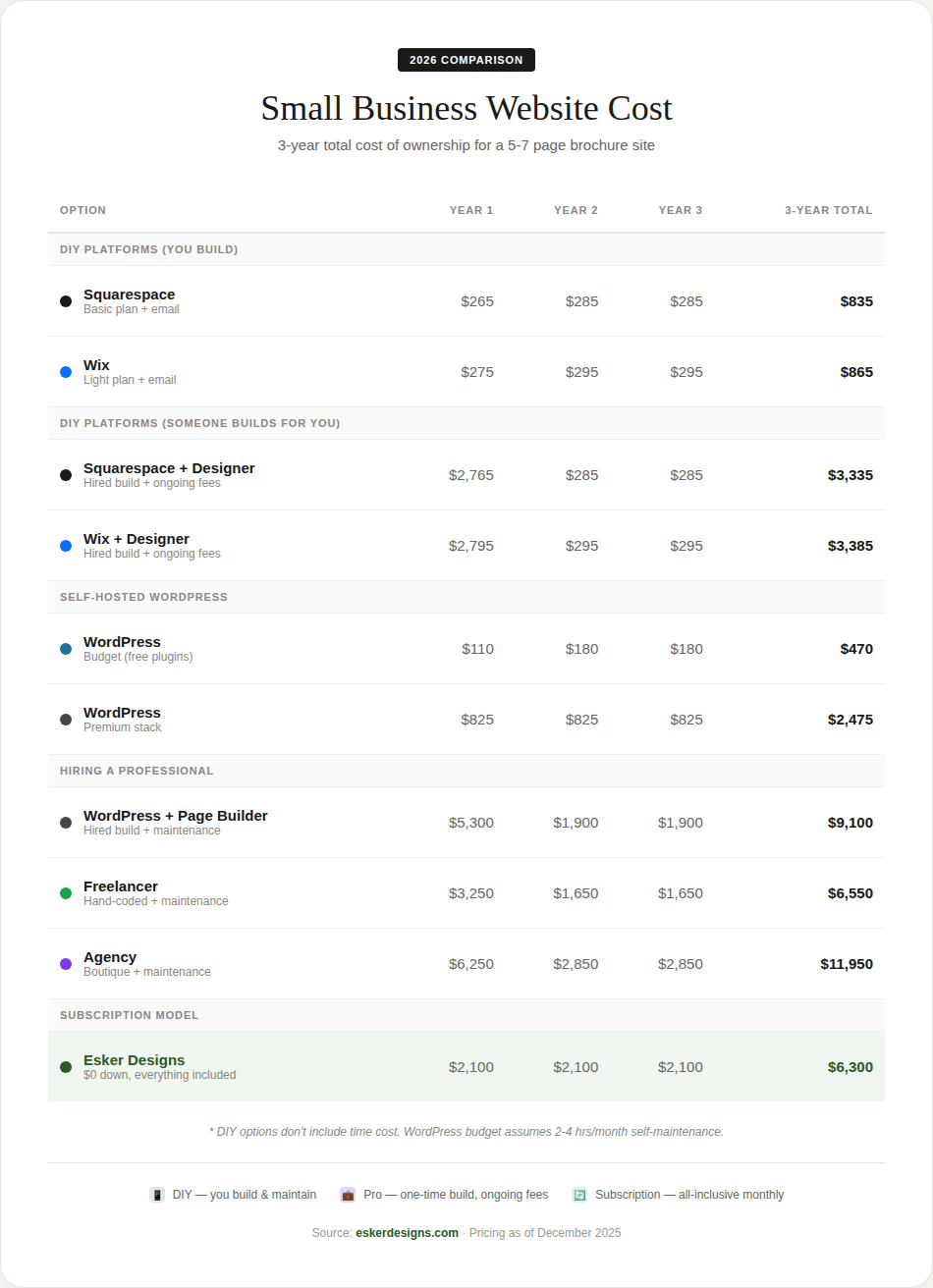
- $0 down
- $175/month
- $6,300 over 3 years
What's Included
- Custom, hand-coded website (not WordPress or page builders)
- Hosting
- SSL certificate
- Ongoing maintenance and updates
- Support when you need it
- Content updates within reason
Why Hand-Coded
Instead of building on WordPress with plugins and page builders, I write clean HTML, CSS, and JavaScript. This takes more time upfront, but the results are faster load times, better security (no WordPress vulnerabilities to worry about), and code that's easier to maintain long-term.
Ownership
If you ever decide to move on, you own your code and content. It's clean, portable work that any developer could pick up — no proprietary lock-in or shortcode mess to deal with.
Who This Works Well For
- Small business owners who'd rather not think about their website
- People who've had frustrating experiences with DIY platforms or past designers
- Those who want professional quality without a large upfront investment
Who Might Be Better Served Elsewhere
- People who enjoy building and maintaining their own sites
- Businesses needing complex e-commerce with many products
- Anyone whose primary concern is finding the absolute lowest cost
I'm not trying to be the right fit for everyone. If you genuinely enjoy working on your website and have the time for it, a DIY platform might be a great choice. If you need advanced e-commerce capabilities, you might need Shopify or a larger agency. But if you're a small business owner who wants a professional site that works reliably without requiring your ongoing attention, that's what I've built this service around.
So What Should You Do?
After all of this, you might be wondering which option actually makes sense for your situation. Here's how I'd think about it:
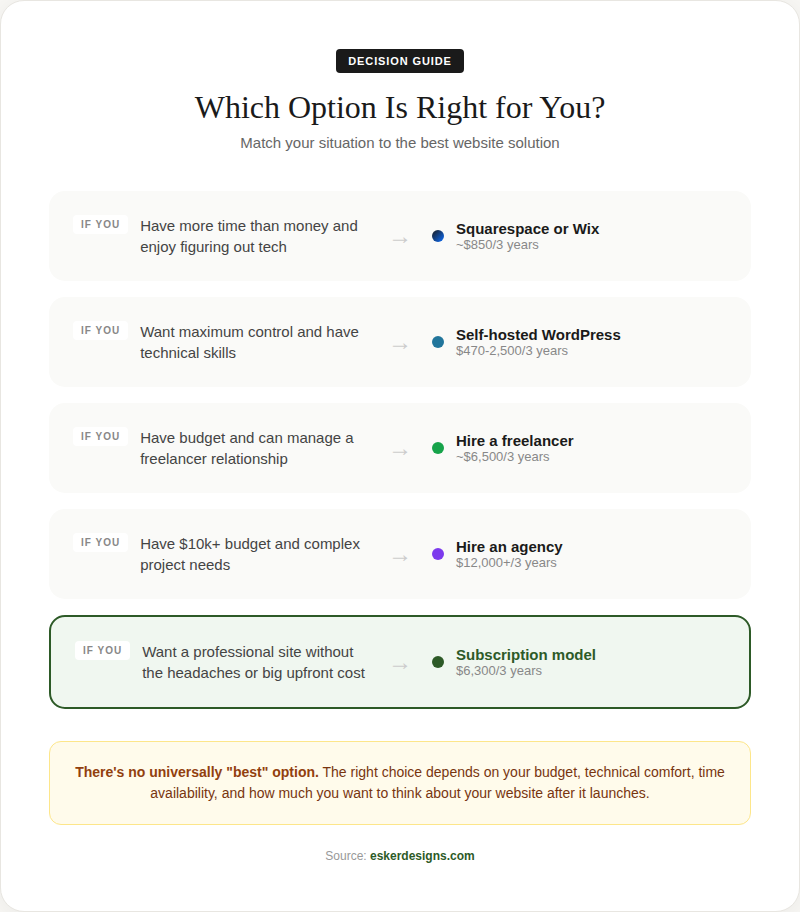
If you have more time than money and are comfortable with technology: Squarespace or Wix could work well. You'll invest time learning the platform and building your site, but the ongoing costs are relatively low.
If you want maximum control and are technically inclined: WordPress gives you the most flexibility, but comes with real maintenance responsibilities. Make sure you're comfortable with the ongoing technical work, or budget for someone to handle it.
If you'd rather hire someone: A freelancer or agency can take the work off your plate. Just make sure you understand what's included, what platform they're building on, and what happens after the site launches.
If you want professional quality without a large upfront cost or ongoing maintenance burden: A subscription model like mine might be worth considering.
A Few Questions Worth Asking Yourself
- How much is your time worth? If building a DIY site takes 40 hours and your time is valuable, that's a real cost even if the platform is cheap.
- How important is your website to your business? If it's a major source of leads or sales, it's worth investing accordingly.
- How comfortable are you with technology? Be honest with yourself about how much ongoing technical work you want to take on.
- How long do you need this to last? If you're planning to rebrand soon, a simpler solution might be fine. If this is your business for the long haul, it might be worth investing in something more sustainable.
There's no single right answer that works for everyone. The best choice depends on your budget, your time, your technical comfort level, and how much you want to think about your website once it's live.
If you have questions about your specific situation, feel free to reach out. I'm happy to talk through your options, even if you end up going a different direction. I'd rather you make the right decision for your business.
Like this post? Make Esker one of your preferred sources so our work shows up higher in your Google results.